Channel 1 Open the trainer

A dispatch console trainer for public safety telecommunicators.

The student takes the 911 call, sends the run card, tones out and works the radio. The instructor plays the caller and the field. Recorded units acknowledge, arrive, give size-ups and ask for things. Every action is timed and scored.

A practice call at four times speed, from the first ring to the debrief.

No accounts, no server

Nothing to sign up for and nothing to host. The consoles talk to each other directly.

Speech stays on the computer

Speech recognition runs on the student's own machine. Students talk to the caller and on the radio, or type.

Follows the course

Built on the Alabama Fire College Public Safety Telecommunicator I/II course (NFPA 1061), with a fire-service focus.

Five scenarios

Structure fire, vehicle fire, brush fire, a school fire alarm and a wreck with entrapment.
How a call runs

The dispatch console tracks five steps across the top of the screen and lights the panel for the step the student is on.

  1. 1

    Answer the call

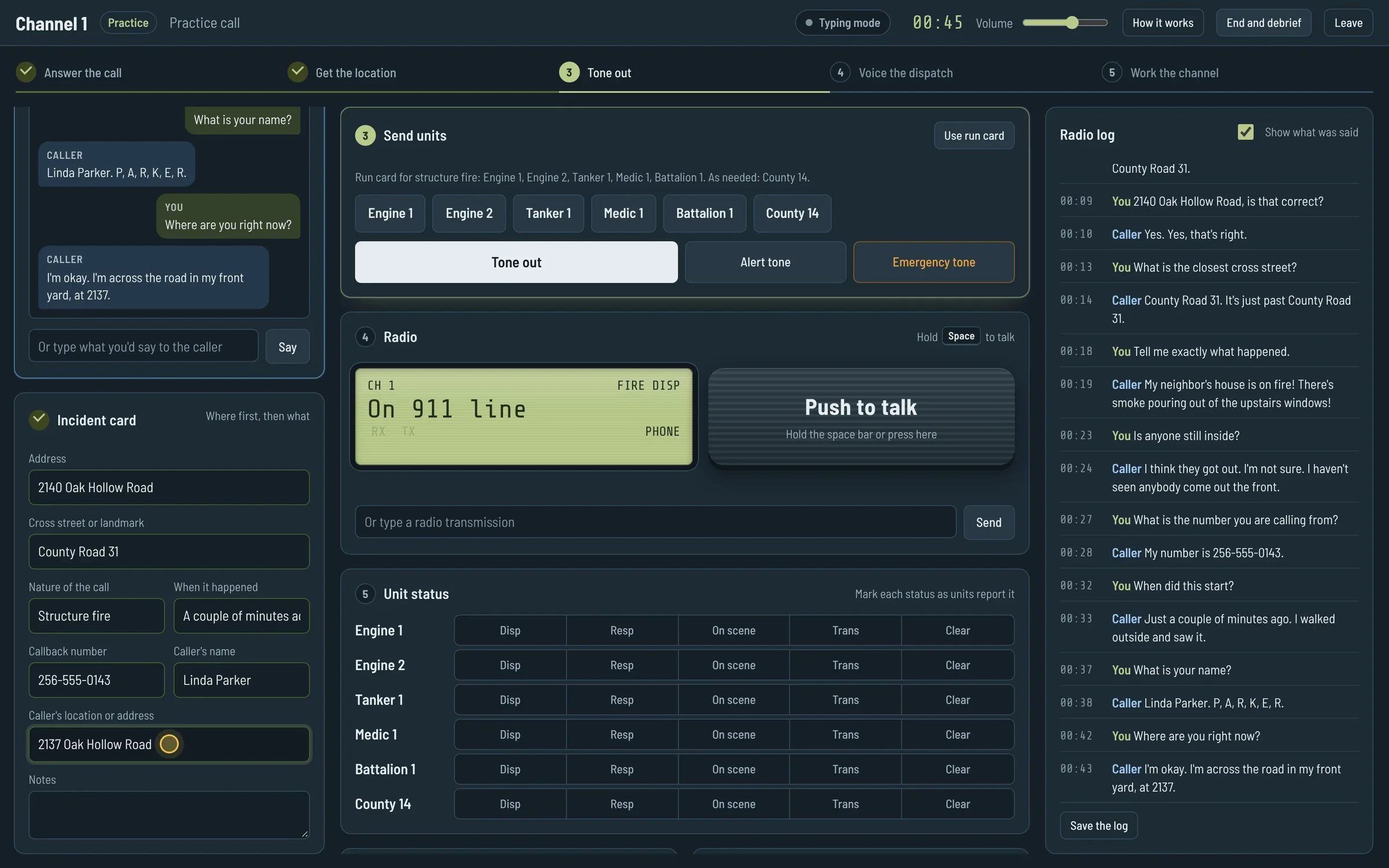
    The 911 line rings. The student answers and talks. The caller answers what is asked: where, what happened, anyone hurt, a callback number.

  2. 2

    Get the location

    Address first, then the rest of the incident card. A correct read-back gets a yes; a wrong one gets corrected.

  3. 3

    Tone out

    Typing the nature of the call brings up its run card. Pick the units and send the tones.

  4. 4

    Voice the dispatch

    Hold the space bar and give the units, the nature and the address. Leave the address out and a unit asks for it.

  5. 5

    Work the channel

    Answer call-ups, keep the status board current, rebroadcast the size-up and log the benchmarks.

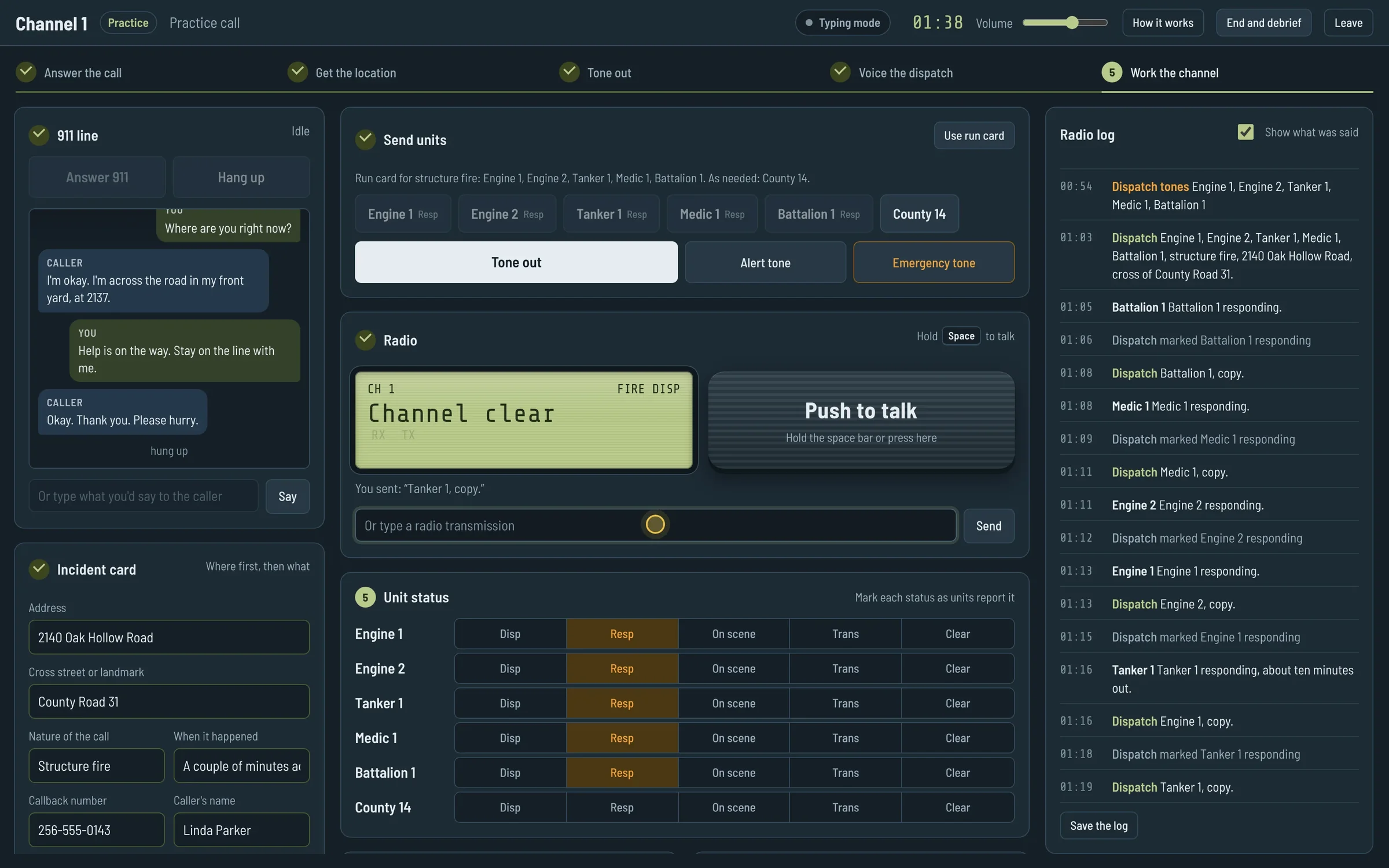
Dispatch console during a 911 call: the caller conversation on the left, the incident card filled in with 2140 Oak Hollow Road, County Road 31 and Structure fire, and the flow strip at Tone out
On the 911 line. The card fills in as the caller answers.
Dispatch console after the tones: five units marked responding on the status board and their transmissions in the radio log
After the tones. Units report, the board follows, the log keeps every transmission.

Two consoles on one channel

The student sits at the dispatch console. The instructor sits at the instructor console on the field side, and can be in another room.

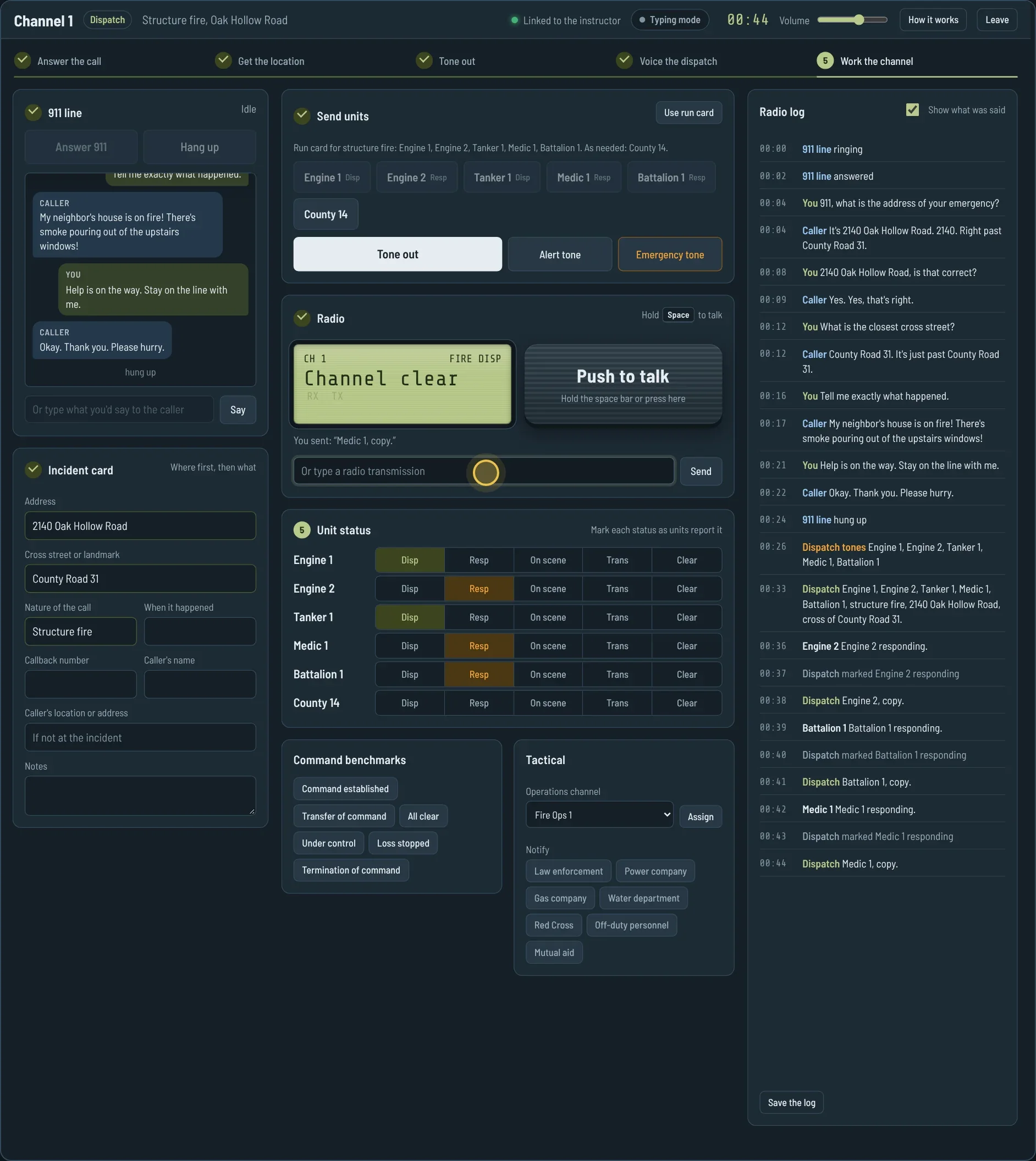
Instructor console on the left, dispatch console on the right, linked for a class. 1:54.

Dispatch console

The student's seat.

  • A 911 line the student answers and talks on
  • The incident card: address, cross street, nature, time, callback, caller
  • Run cards and three tones: dispatch, alert and emergency
  • A radio keyed with the space bar or the on-screen key
  • A status board for every unit on the call
  • Benchmarks, an operations channel and agency notifications
  • A radio log of everything said, saved as text
Dispatch console linked to an instructor, with units marked responding

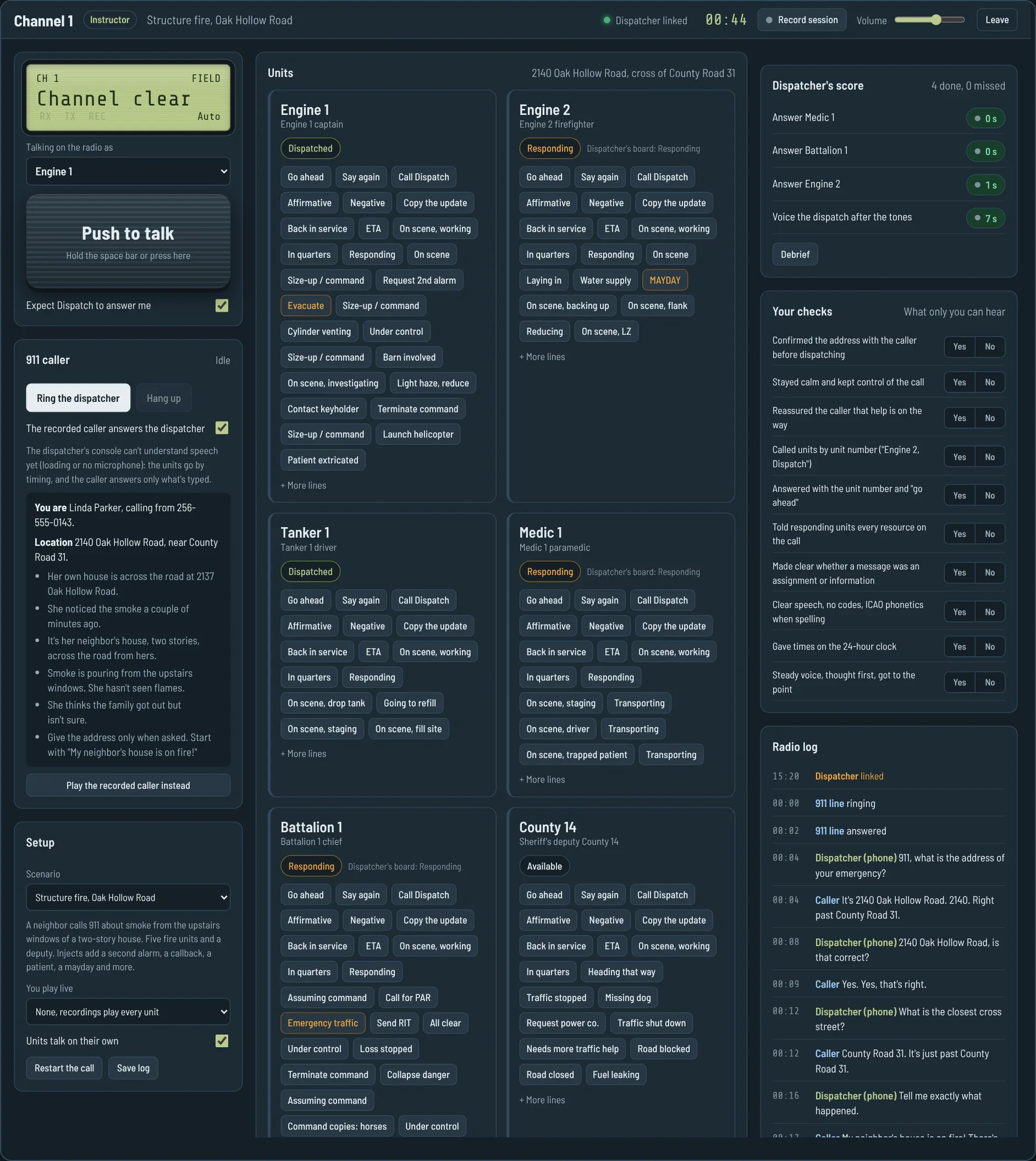
Instructor console

The field side.

  • Ring the dispatcher's 911 line
  • Let the recorded caller answer, or play the caller live from the script on screen
  • Talk on the radio as any unit
  • Play recorded traffic for each unit with one click
  • Throw injects: a second alarm, a callback, a mayday, a collapse, an evacuation
  • Watch the score build, and tick the checks only a person can hear
  • Run the debrief and record the session
Instructor console with unit cards, the caller script, the live score and the instructor's checks

Practice alone

One computer, no instructor. Practice picks one of the five scenarios at random. The recorded caller answers the student's questions and the recorded units answer the dispatch.

Start a practice call

The field reacts to the dispatcher

Units call up, step on each other and ask for what was left out, the way a real channel does. Speech recognition reads what the student says, so units answer the words, not just the timing.

  • Engine 1 Dispatch, Engine 1.

    Call-ups. A unit with a request calls first and waits for an answer. It calls again if nobody answers, then says it anyway.

  • Engine 2 Engine 2, you were broken up. Say again?

    Stepped on. Key up over a unit and that unit asks you to repeat. Doubles squeal and count against the score.

  • Engine 1 Dispatch, Engine 1. Can you repeat that address?

    Short dispatch. Tones with no voice dispatch, or a dispatch without the address, get a request for it.

  • Tanker 1 Tanker 1, copy the update.

    Acknowledgments. Rebroadcast the size-up, relay Command's word or send what Command asked for, and units copy it.

A full practice call

Structure fire on Oak Hollow Road, in real time. The student types here instead of talking; spoken words go through the same understanding.

2:23. Answer, interview the caller, tone out, voice the dispatch, work the board, debrief.

Scenarios

Each call has its own caller, run card and injects. The instructor picks one under Setup.

Scenario Caller What makes it hard
Structure fire, Oak Hollow Road Scared neighbor Size-up, second alarm, a callback about the dog, collapse, mayday
Vehicle fire, Highway 9 Rattled young driver Located by a store and a mile marker; propane cylinders; Command asks for more units
Brush fire, Pine Ridge Road Rambling, hard-of-hearing farmer Controlling the call; Forestry Commission; a barn catches; second alarm and mutual aid; horses
Fire alarm, Riverside Elementary Alarm company operator Full response to a school, then turning units around; a keyholder
Wreck with entrapment, Highway 278 Crying, injured driver Two patients; a helicopter on standby, then launched with a landing zone

What it scores

The simulator knows when everyone keyed up, which tones went out and what the card, board and notifications show. That covers most of what the course grades. The instructor ticks the rest.

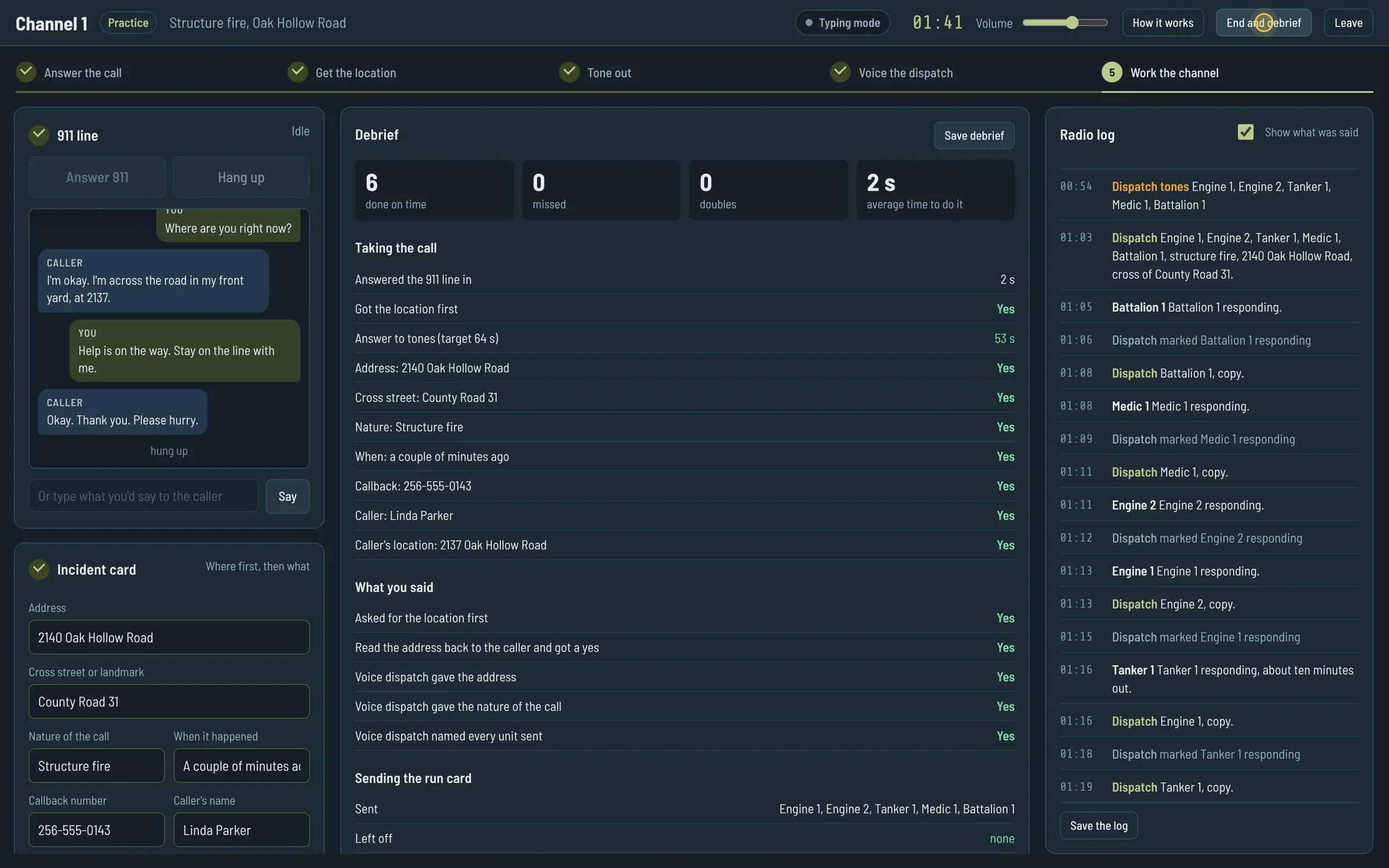
The debrief after a practice call: 6 done on time, 0 missed, 0 doubles, with the call-taking checks all marked yes
The debrief after a practice call. It saves as plain text.

Taking the call

  • Time to answer
  • Whether the location came first
  • Answer to tones, against a 64-second target
  • The minimum information on the card

Sending the run card

  • Which units were sent and which were left off
  • Extra units aren't marked wrong; the course says to err on the side of caution

Radio and tactical

  • Voicing the dispatch after the tones
  • Answering every unit within 12 seconds
  • Rebroadcasting the size-up, relaying callbacks to Command
  • Operations channel, agency notifications, emergency traffic

Status board

  • Each unit's new status marked within 30 seconds of the report

Benchmarks

  • Command established and transfer of command
  • All clear, under control and loss stopped
  • Termination of command

The instructor's checks

  • Confirmed the address, stayed calm, reassured the caller
  • Called units by number, answered with "go ahead"
  • Clear speech, ICAO phonetics, 24-hour times

Try the trainer

It runs in a browser. For a class, both consoles open as two tabs on the same computer.

  1. Open the trainer in two tabs.
  2. Pick Dispatch console in one and Instructor console in the other, with the same room name.
  3. Wear headphones so the microphone doesn't pick up the speakers.
  4. On the instructor console, press Ring the dispatcher.

For a solo run, press Start practicing on the first screen. The speech model downloads once, about 80 MB, and the browser keeps it.

The Channel 1 start screen with Run a class, a room name field, Dispatch console, Instructor console and Practice alone
The first screen. Pick a seat.